
How to add booking and online ordering to your website and Google
Share your booking and ordering links, embed them on WordPress, Wix or any website, and add Reserve and Book Now buttons to Google and Facebook.
Guests book and order wherever they find you: your website, Google Maps, Instagram or a link a friend sent. Every one of those places should lead straight to your own booking and ordering pages, where you keep the guest’s details and pay no commission.
Everything in this guide is in Settings > Notifications & integrations > Widget installation.
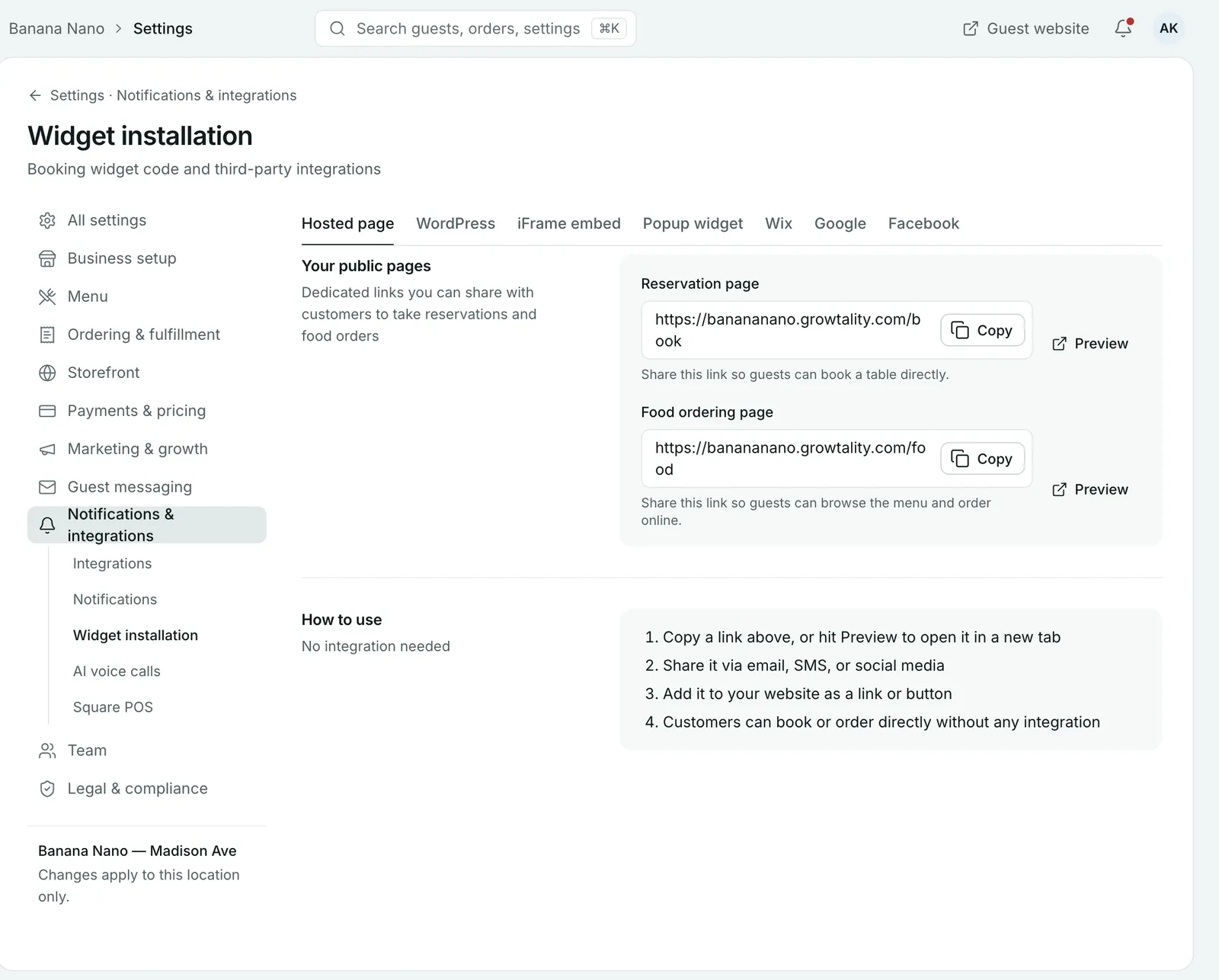
The quickest way: share your links
The Hosted page tab has your two public pages:
- Reservation page: guests book a table.
- Food ordering page: guests browse your menu and order online.
Select Copy to copy a link, or Preview to open it in a new tab. No integration is needed. Put the links:
- in your Instagram and TikTok bios
- on your Facebook page
- in your email signature and on your receipts
- as a button on your website
Add the booking widget to your website
Pick the tab for how your website is built. Each one has its own step-by-step instructions.
| Tab | What you do |
|---|---|
| WordPress | Upload the plugin (Plugins > Add new > Upload plugin), activate it, enter your API key in the plugin settings, then add the shortcode to any page or post. |
| Wix | In the Wix editor, add an HTML iframe (Add > Embed code > Embed HTML) and paste the Wix embed code. |
| iFrame embed | Copy the embed code and paste it into your website’s HTML where the widget should appear. Allow at least 600px of height. |
| Popup widget | Paste the code into your website’s HTML before the closing body tag. The widget opens as a popup over your page. |
If your website is managed by someone else, send them this page and the code from the right tab.
Tip: Put a “Book a table” button in your website’s header, so it’s on every page, not only the contact page.
Get a Reserve button on Google
Most guests find a restaurant on Google Search or Maps. Open the Google tab, connect your Google Business Profile and select your business location. A Reserve button then shows on your Google listing.
Get a Book Now button on Facebook
Open the Facebook tab, connect Facebook and select your page. A Book Now button shows on your Facebook page.
Make it look like your restaurant
Your pages use your logo and brand colours from Settings > Business setup > General. To change the template, colours, banner and pinned dishes, go to Settings > Storefront and open Ordering page or Reservation page.
Common questions
Do I need a website to take bookings and orders?
No. You get a hosted reservation page and food ordering page with their own links. Share them by email, text or social media, or add them to your Instagram bio.
Can I add the booking widget to WordPress?
Yes. Open the WordPress tab in Widget installation. You upload and activate the Growtality plugin, enter your API key, then add the shortcode to any page or post.
How do I get a Reserve button on Google?
Open the Google tab, connect your Google Business Profile and select your business location. A Reserve button then shows on Google Search and Maps.
How tall should the embedded widget be?
Give the iframe at least 600px of height. You can change the height in its style attribute.
Still stuck? Submit a ticket
Tell us what you're trying to do. We'll attach this guide to your ticket, so you don't have to explain it twice.