
How to set up Growtality for your restaurant: your first-week checklist
The six steps that get your restaurant ready to take bookings and online orders, in the order that saves the most time, and where to find each one.
Your first week decides how quickly Growtality starts paying for itself. Get the basics right and guests can book and order from day one. Skip them and you’ll spend service fixing opening hours and missing tables.
The Today page has a Complete your setup checklist that tracks six steps and shows how many are done. This guide walks through them in order.
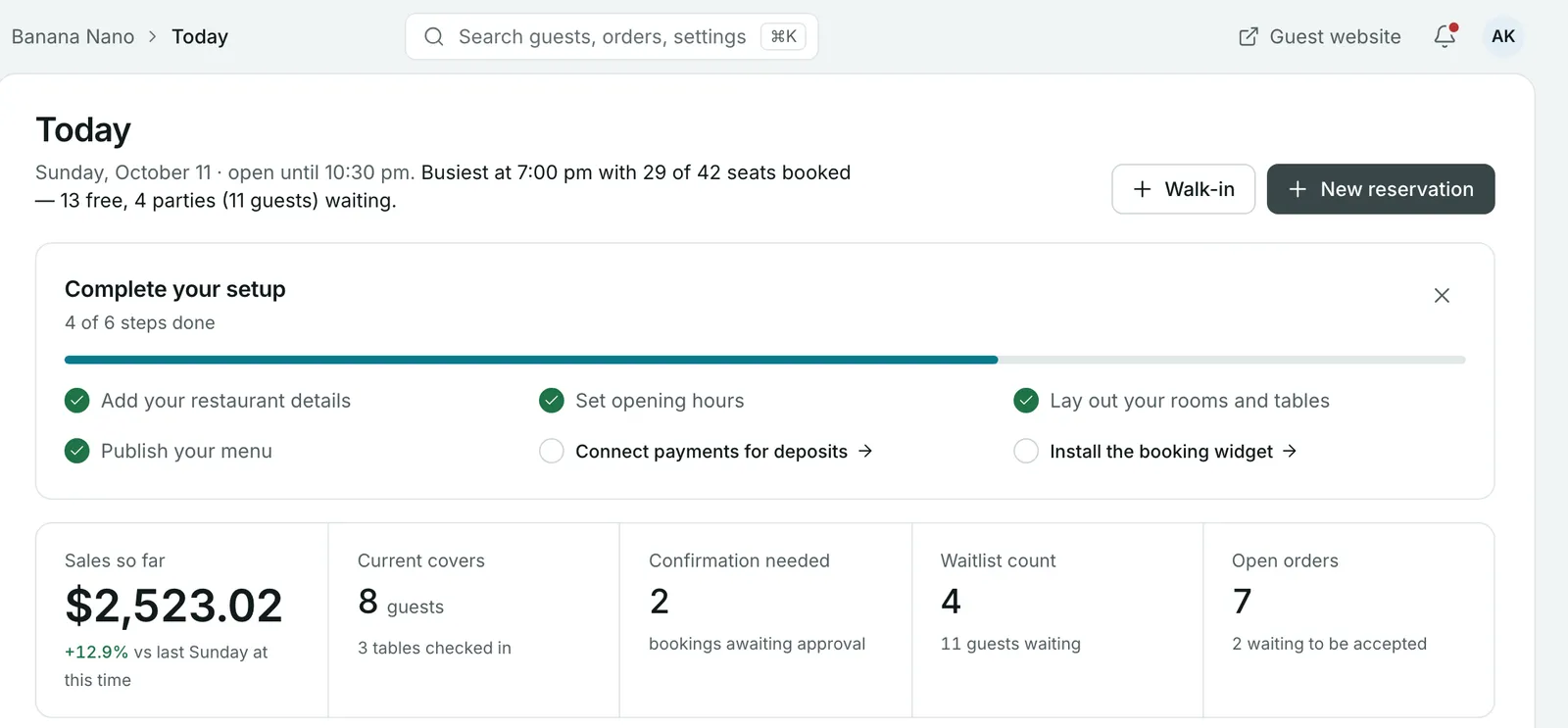 The checklist sits at the top of Today until every step is done.
Prefer to hand it over? Setup and moving your data from your current system are free, with no contract. Your account manager can do all six steps with you, or for you.
Find anything quickly
Two shortcuts save time all week:
- Press ⌘ K on a Mac or Ctrl K on Windows to search pages, settings, orders and reservations.
- In Settings, use the search box at the top, for example “deposits” or “hours”.
Step 1: Add your restaurant details
Go to Settings > Business setup > General. On the Restaurant setup tab, add your restaurant’s name, logo and brand colours. On Location details, add your address, phone number and email, and check the Time zone: Growtality uses it for every booking and order time.
Step 2: Set your opening hours
Go to Settings > Business setup > General and open the Operating hours tab. Set your weekly schedule, then add special dates, such as bank holidays, when your hours change. Dishes without their own time window follow these hours too.
Step 3: Lay out your rooms and tables
Go to Settings > Business setup > Rooms. Add each dining area, such as your main room or terrace, then add tables with the number of seats each one takes.
Match the plan to your real floor. You can drag, resize and rotate tables and add room features, then save the layout. The tables you save here are the ones your team assigns when they seat guests and take bookings. See How to set up your restaurant floor plan and tables.
Step 4: Publish your menu
Go to Menu, add your categories and dishes, and set each dish to Active when it’s ready to order. This is the step with the most detail, so it has its own guide: How to set up your menu for online ordering.
Step 5: Connect payments for deposits
Go to Settings > Payments & pricing > Payment configuration. Connect Stripe or PayPal, choose how you take deposits and decide whether you accept cash on delivery.
Connecting payments lets guests pay for online orders and lets you take deposits on bookings, which protects your busiest nights from no-shows. See How to connect payments and set up taxes and How to take booking deposits and cut no-shows.
Step 6: Install the booking widget
Go to Settings > Notifications & integrations > Widget installation. You can share your hosted booking page as a link, or embed the widget on your own website. Add it to your Google Business Profile, Instagram and Facebook too, so guests can book wherever they find you. See How to add booking and online ordering to your website and Google.
Before you share it, check your rules in Settings > Business setup > Booking, where you set party sizes, time slots and how far ahead guests can book. See How to set up online table bookings.
When the checklist is done
The checklist disappears once every step is complete, and you can hide it at any time with the close button. From then on, Today is your view of the day: sales so far, guests in the room, bookings waiting for approval, the waitlist and open orders.
Common questions
How long does it take to set up Growtality?
Most restaurants work through the six setup steps over a few days, around service. If you'd rather not do it yourself, setup and moving your data from your current system are free, and the team usually has you set up within two business days.
Can I take bookings before I've finished setup?
Guests book through your booking widget, so install it once your opening hours, tables and booking rules are in place. Connecting payments first means you can take deposits from your first booking.
Where do I find a setting I can't see?
Press Cmd+K on a Mac or Ctrl+K on Windows to search every page and setting, or open Settings and type in its search box, for example 'deposits' or 'hours'.
Is there a contract?
No. There's no contract, and you have a direct account manager you can phone while you get set up.
Still stuck? Submit a ticket
Tell us what you're trying to do. We'll attach this guide to your ticket, so you don't have to explain it twice.